
JDisc Cloud Discovery for Mobile Device Management: Discover SOTI Devices Easily

Managing Mobile Devices for IT Inventory A person managing multiple mobile devices on a desk in a modern office, symbolizing mobile device management.

Mobile Device Management is no longer a luxury in today’s enterprise landscape, it’s a necessity. Managing mobile and remote devices effectively is critical for security, compliance, and visibility. Platforms like  SOTI MobiControl have become essential in helping IT teams control Android and Windows endpoints across distributed environments. However, there’s often a missing piece: how do you integrate this wealth of mobile device management data into your broader IT asset inventory?

That’s why we’re excited to bring native support for SOTI MobiControl within our Cloud Discovery module in JDisc Discovery!

With this new feature, JDisc bridges the gap between Mobile Device Management and IT asset discovery, providing seamless insight into your mobile infrastructure directly within your central inventory database.

📱 Why SOTI Mobile Device Management Discovery in JDisc Matters

In addition, SOTI MobiControl helps IT teams manage Android and Windows devices across complex deployments (iOS may be partially supported but hasn’t been validated yet). With our integration:

  • You no longer need to maintain a separate asset source for mobile data.
  • Devices enrolled in SOTI now appear alongside desktops, servers, printers, and cloud instances.
  • You can track compliance, hardware details, and connectivity—all in one place, automatically discovered.

📁 How Mobile Device Management Groups Appear in JDisc

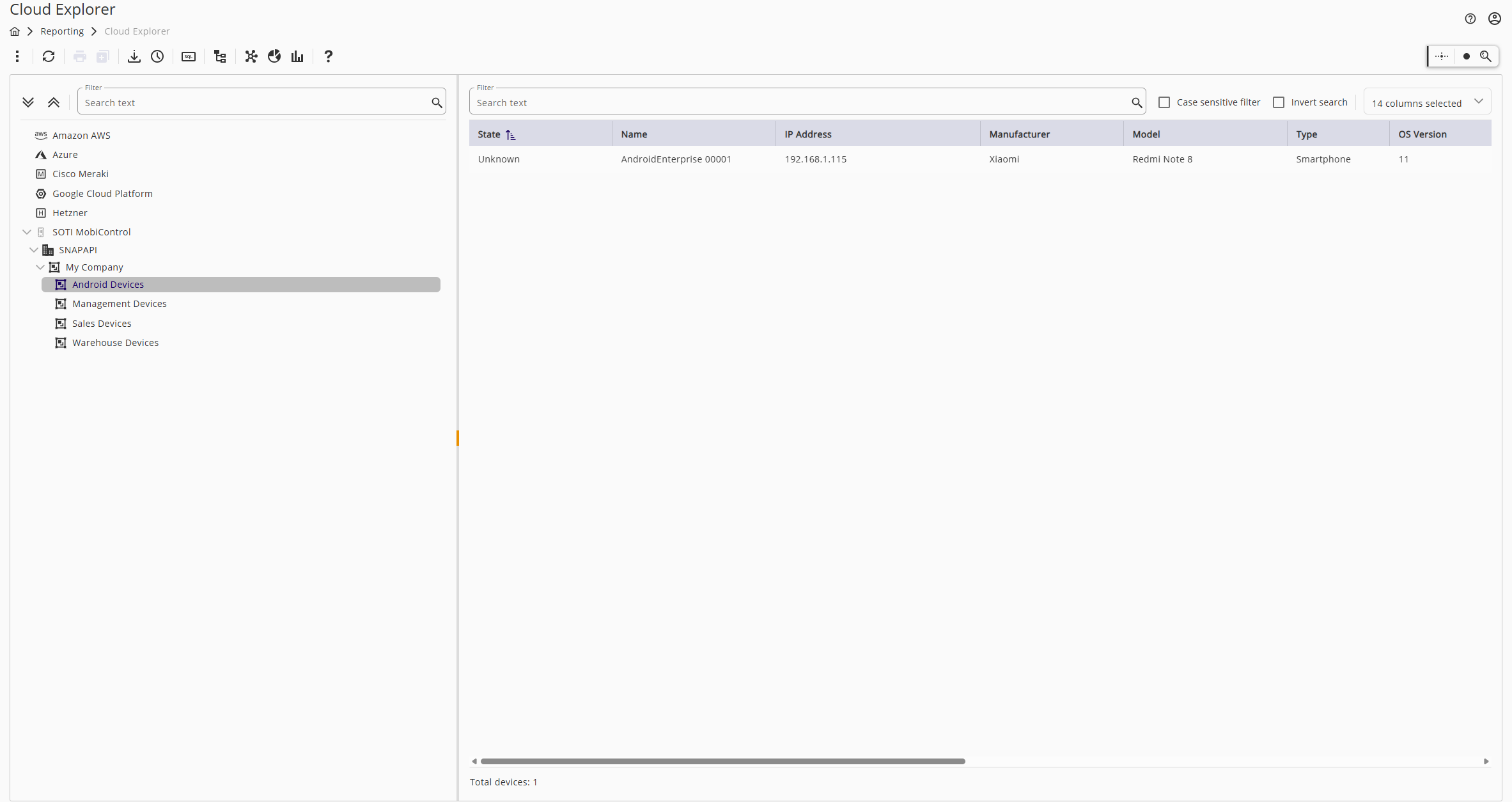
JDisc mirrors the Device Groups structure from SOTI:

  • JDisc preserves parent and child groups during discovery.
  • It also maps device assignments directly from SOTI.

This structure helps you retain context about how devices are grouped and managed inside SOTI, making navigation and reporting more intuitive.
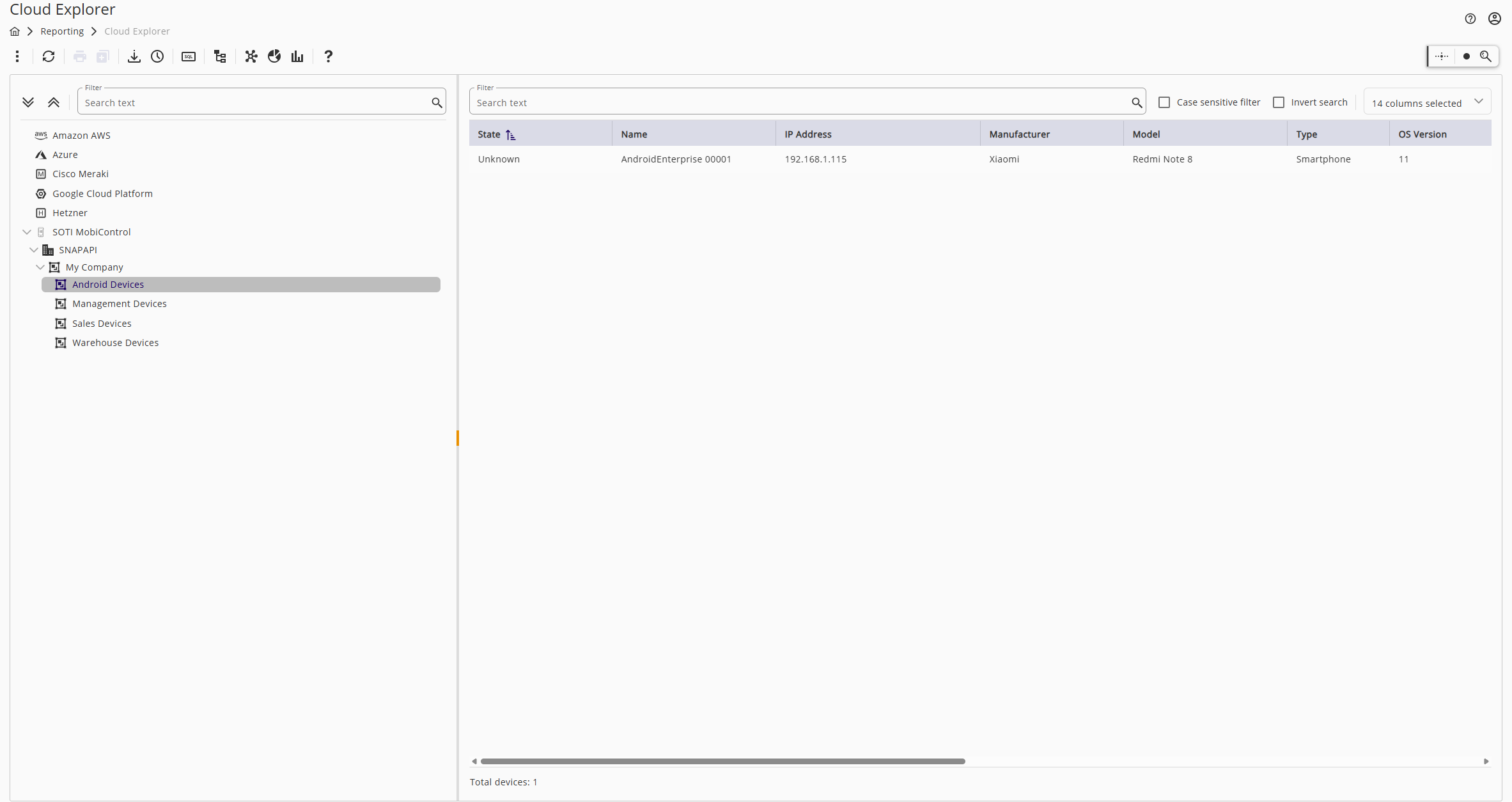
Screenshot of JDisc Cloud Explorer with SOTI MobiControl Mobile Device Management integration.
Cloud Explorer with SOTI MobiControl Integration Visualizing mobile device data in JDisc

📱 Mobile Device Management Inventory: What JDisc Discovers

Each enrolled device in SOTI is reflected in JDisc as a complete inventory object. For each device, we fetch:

  • Device type and model (e.g., Samsung Galaxy Tab Active, Zebra handhelds)
  • OS version and build
  • Serial numbers, IMEI, and phone numbers
  • Hardware details such as memory and SIM information
  • Compliance state and security status

This lets you enrich your inventory with valuable data from your mobile fleet, without manual exports or API coding.

🔧 How to Get Started

Integrating SOTI into JDisc is straightforward, but some setup is required on both sides—in JDisc and inside your SOTI environment.

📌 Prerequisites

First, ensure that your organization is using either:

  • A web-hosted (cloud) version of SOTI MobiControl, or
  • A locally installed (on-premises) instance.

JDisc supports both options, but it’s important that your SOTI server is reachable by the JDisc Discovery system, either over the internet (for cloud setups) or within your internal network (for local setups).

Next, you’ll need to create a dedicated API user in your SOTI MobiControl system with read-only permissions to expose device and group data. If you’re unsure how to do this, there is a short tutorial video (minutes 7:35-9:00) that walks you through the setup process step by step.

🔄 JDisc Configuration Steps

  1. Go to: Discovery → Configuration → Cloud.
  2. Open the SOTI tab.
  3. Click “Add SOTI Server” and fill in the connection details:
    • For cloud/web-based SOTI installations:
      • In the Server Name field, enter the base URL of your SOTI environment. For example:
        a00XXXXX.mobicontrol.cloud
        (The full URL used internally by SOTI might look like https://a00XXXXX.mobicontrol.cloud/MobiControl/WebConsole, but for JDisc, the base domain is sufficient.)
      • Provide the Username, Password, Client ID, and Client Secret associated with the API user.
    • For local/on-premise SOTI installations:
      • The Server Name can be any label of your choice—it does not affect the connection.
      • You must correctly specify the Server Address (FQDN or IP) and the Server Port.
        • If your SOTI server uses HTTPS on port 443 (the default), simply leave the port as-is.
  4. Save the configuration.

🚀 Running the Discovery

Once your SOTI server is configured, you’ll need to trigger a Cloud Discovery Job (not a traditional IP/network scan). This will initiate API communication, allowing JDisc to:

  • Retrieve device group structures
  • Import all enrolled Android and Windows devices
  • Populate your central IT inventory with detailed mobile asset data

To start the discovery process, run a Cloud Discovery Job (not a standard network scan). This ensures the SOTI integration is properly queried, and devices are synchronized into your inventory.

🤝 Why SOTI Mobile Device Management Matters

With mobile endpoints playing a central role in modern IT, integrating SOTI MobiControl with JDisc provides:

  • Unified visibility: Mobile and traditional devices on the same pane of glass.
  • Better compliance: Track security posture and detect policy gaps across platforms.
  • Smarter reporting: Correlate mobile data with licensing, lifecycle, and ownership.

If you’re already using JDisc Discovery and SOTI, this is the perfect time to connect the dots. And if you haven’t yet explored our other integrations—like AWS, Azure, or VMware—check out our Cloud Discovery modules to expand your visibility further.

Stay secure, stay informed,
Raphael


About The Author

Raphael Nikou
I am a Junior Java Software Developer at JDisc, where I specialize in the design and implementation of the Discovery engine. My primary focus is on enhancing the core functionalities of the Discovery component, ensuring accurate and efficient data retrieval and system integration. Feel free to contact me on LinkedIn.

Leave A Comment

JDisc Cloud Discovery für Mobile Device Management: SOTI-Geräte einfach entdecken

Managing Mobile Devices for IT Inventory A person managing multiple mobile devices on a desk in a modern office, symbolizing mobile device management.

Mobile Device Management ist in der heutigen Unternehmenslandschaft kein Luxus mehr, sondern eine Notwendigkeit. Die effektive Verwaltung mobiler und entfernter Geräte ist entscheidend für Sicherheit, Compliance und Transparenz. Plattformen wie SOTI MobiControl sind unverzichtbar geworden, um IT-Teams bei der Kontrolle von Android- und Windows-Endpunkten in verteilten Umgebungen zu unterstützen. Oft fehlt jedoch ein Teil: Wie integrieren Sie diese Fülle von Daten zur Verwaltung mobiler Geräte in Ihr umfassenderes IT-Inventar?

Deshalb freuen wir uns, dass wir SOTI MobiControl in unserem Cloud Discovery Modul in JDisc Discovery nativ unterstützen können!

Mit diesem neuen Feature schließt JDisc die Lücke zwischen Mobile Device Management und IT Asset Discovery und bietet einen nahtlosen Einblick in Ihre mobile Infrastruktur direkt in Ihrer zentralen Inventardatenbank.

📱 Warum SOTI Mobile Device Management Discovery in JDisc wichtig ist

Darüber hinaus unterstützt SOTI MobiControl IT-Teams bei der Verwaltung von Android- und Windows-Geräten in komplexen Implementierungen (iOS wird möglicherweise teilweise unterstützt, wurde aber noch nicht validiert). Mit unserer Integration:

  • Sie müssen keine separate Asset-Quelle für mobile Daten mehr pflegen.

  • In SOTI registrierte Geräte werden jetzt neben Desktops, Servern, Druckern und Cloud-Instanzen angezeigt.

  • Sie können Compliance, Hardware-Details und Konnektivität nachverfolgen – alles an einem Ort und automatisch erkannt.

📁 Wie Mobile Device Management Gruppen in JDisc angezeigt werden

JDisc spiegelt die Gerätegruppenstruktur von SOTI wider:

  • JDisc bewahrt Eltern- und Kindgruppen während der Suche.

  • Es bildet auch die Gerätezuordnungen direkt von SOTI ab.

Diese Struktur hilft Ihnen, den Zusammenhang zwischen der Gruppierung und Verwaltung von Geräten innerhalb von SOTI zu bewahren, was die Navigation und die Berichterstattung intuitiver macht.

Screenshot von JDisc Cloud Explorer mit SOTI MobiControl Mobile Device Management Integration.
Cloud Explorer mit SOTI MobiControl Integrierte Visualisierung von Mobile Device Management

📱 Bestandsaufnahme der Mobile Device Management: Was JDisc herausfindet

Für jedes registrierte Gerät in SOTI erstellt JDisc ein vollständiges Inventarobjekt. Es werden u. a. folgende Daten erfasst:

  • Gerätetyp und Modell (z. B. Samsung Galaxy Tab Active, Zebra Handhelds)

  • Betriebssystemversion und Build

  • Seriennummern, IMEI und Telefonnummern

  • Hardwaredetails, einschließlich Speicher und SIM-Informationen

  • Compliance-Status und Sicherheitsinformationen

Damit bereichern Sie Ihre Inventarisierung automatisch mit relevanten mobilen Daten – ganz ohne manuellen Export oder eigene API-Skripte.

🔧 So starten Sie mit der Integration

Die Integration von SOTI in JDisc ist einfach, erfordert aber eine kurze Vorbereitung auf beiden Seiten.

📌 Voraussetzungen

Ihre Organisation verwendet entweder:

  • eine Cloud-basierte (Web-)Version von SOTI MobiControl, oder

  • eine lokale (On-Premises) Installation.

JDisc unterstützt beide Varianten – entscheidend ist, dass der JDisc-Server die SOTI-Instanz erreichen kann (entweder über das Internet oder im lokalen Netzwerk).

Sie benötigen außerdem ein dediziertes API-Benutzerkonto mit Lesezugriff in Ihrer SOTI-Umgebung.

📽 Ein kurzes Tutorial-Video (Minute 7:35–9:00) zeigt die Einrichtung Schritt für Schritt.

🔄 JDisc-Konfigurationsschritte

  1. Öffnen Sie: Discovery → Konfiguration → Cloud

  2. Wechseln Sie in den Reiter SOTI

  3. Klicken Sie auf „SOTI-Server hinzufügen“ und geben Sie die Verbindungsdaten ein:

Für Cloud/Web-basierte SOTI-Installationen:

  • Servername: Basis-URL Ihrer SOTI-Umgebung, z. B.
    a00XXXXX.mobicontrol.cloud
    (Nicht die vollständige URL wie https://a00XXXXX.mobicontrol.cloud/MobiControl/WebConsole – nur die Basisdomain genügt.)

  • Geben Sie Benutzername, Passwort, Client ID und Client Secret des API-Nutzers ein.

Für lokale/On-Prem-Installationen:

  • Servername: frei wählbar, dient nur zur Identifikation.

  • Serveradresse: FQDN oder IP-Adresse Ihres SOTI-Servers.

  • Serverport: Standard ist HTTPS über Port 443 – andernfalls anpassen.

  1. Speichern Sie die Konfiguration.

🚀 Discovery starten

Nach der Konfiguration Ihres SOTI-Servers starten Sie bitte einen Cloud Discovery Job (nicht einen klassischen Netzwerkscan).

Dieser ruft über die SOTI-API:

  • Die Gruppenstruktur ab

  • Alle registrierten Android- und Windows-Geräte

  • Alle mobilen Gerätedaten zur automatischen Inventarisierung

So werden Ihre SOTI-Daten zuverlässig mit Ihrer zentralen JDisc-Inventardatenbank synchronisiert.

🤝 Warum die SOTI-Integration zählt

In einer Welt, in der mobile Endgeräte eine Schlüsselrolle spielen, bietet die Integration von SOTI MobiControl in JDisc Discovery:

  • Zentrale Übersicht: Mobile und klassische Geräte gemeinsam in einer Plattform

  • Bessere Compliance: Sicherheitsstatus und Richtlinienverletzungen im Blick

  • Intelligente Berichte: Verknüpfung mobiler Daten mit Lizenzierung, Lebenszyklen und Eigentum

Wenn Sie bereits JDisc Discovery und SOTI nutzen – jetzt ist der perfekte Zeitpunkt, beide Systeme zu verbinden!

Und wenn Sie unsere anderen Integrationen noch nicht ausprobiert haben – wie AWS, Azure oder VMware – lohnt sich ein Blick auf unsere Cloud Discovery Module!

Bleiben Sie sicher, bleiben Sie informiert,
Raphael

About The Author

Raphael Nikou
I am a Junior Java Software Developer at JDisc, where I specialize in the design and implementation of the Discovery engine. My primary focus is on enhancing the core functionalities of the Discovery component, ensuring accurate and efficient data retrieval and system integration. Feel free to contact me on LinkedIn.

Leave A Comment