


AWS EKS Kubernetes Discovery with IAM User or Role
Cloud-native infrastructure isn’t just a trend—it’s the foundation of modern IT environments. As JDisc continues evolving, we’re excited to introduce full support for EKS Kubernetes Discovery, allowing you to scan and retrieve Kubernetes resources on Amazon EKS using either an IAM user or IAM role.
Whether you’re using temporary credentials, instance roles, or IRSA inside EKS, our guide helps you configure secure and compliant access for scanning Kubernetes nodes, pods, and services via JDisc.
🔍 Complete Guide to EKS Kubernetes Discovery via IAM User or Role
This guide walks you through connecting to an EKS cluster, retrieving Kubernetes resources, and running programmatic discovery using a valid kubeconfig—whether you’re using an IAM user or an IAM role.
📌 Prerequisites for EKS Kubernetes Discovery
Before you begin, ensure the following are set up:
-
✅ AWS CLI installed
-
✅
kubectlinstalled -
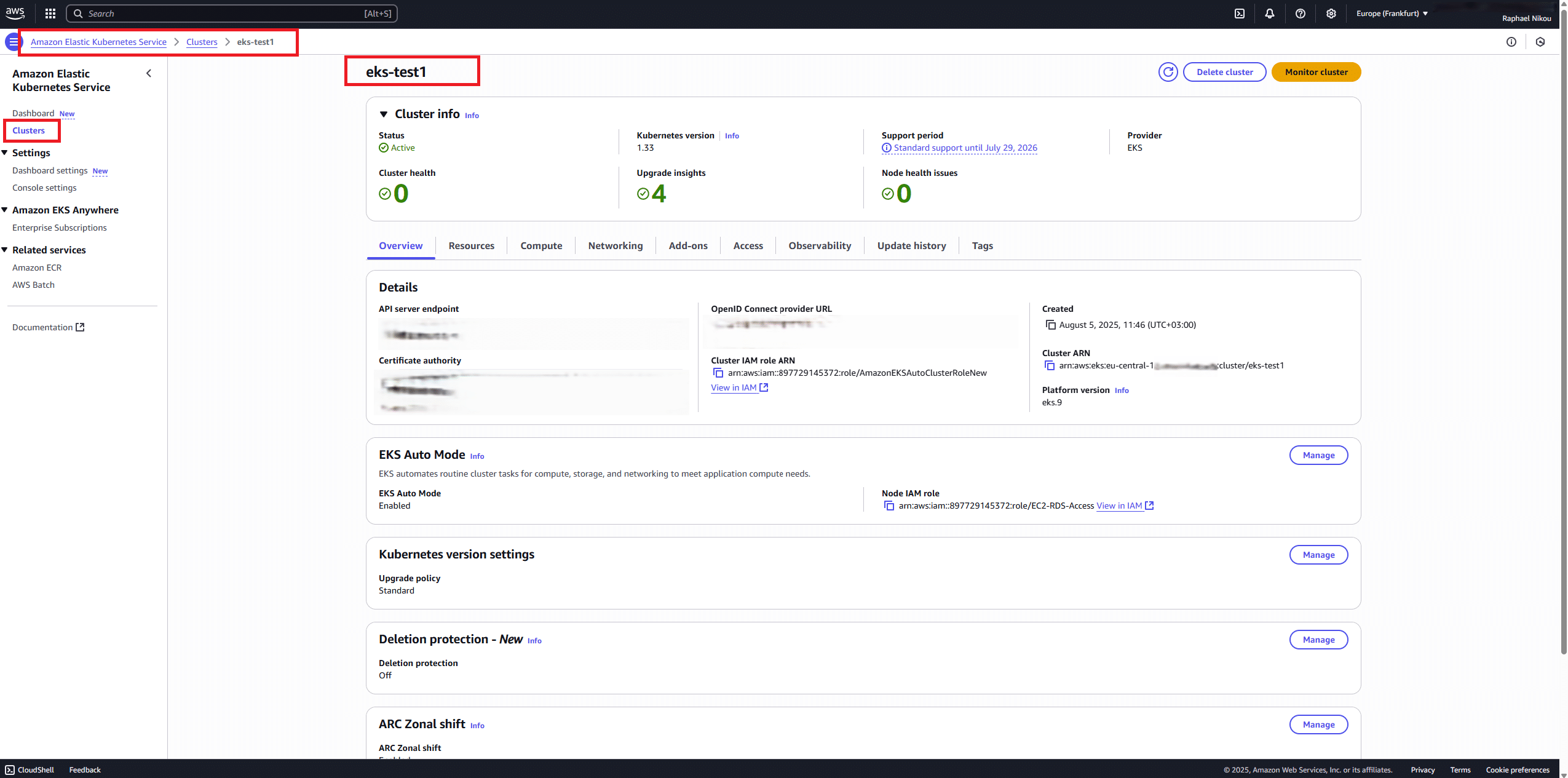
✅ EKS cluster created (e.g.,
eks-test1) -
✅ Either:
-
IAM user with credentials
-
OR IAM role with
sts:AssumeRolepermissions
-
-
✅
AmazonEKSClusterAdminPolicyattached to the principal-
✅ IAM principal has the following permissions:
-
👤 Part A: EKS Kubernetes Discovery with IAM User Access
🔐 Step 1: Configure AWS CLI
Provide:
-
Access Key ID
-
Secret Access Key
-
Region (e.g.,
eu-central-1) - Output Format: json
Verify identity:
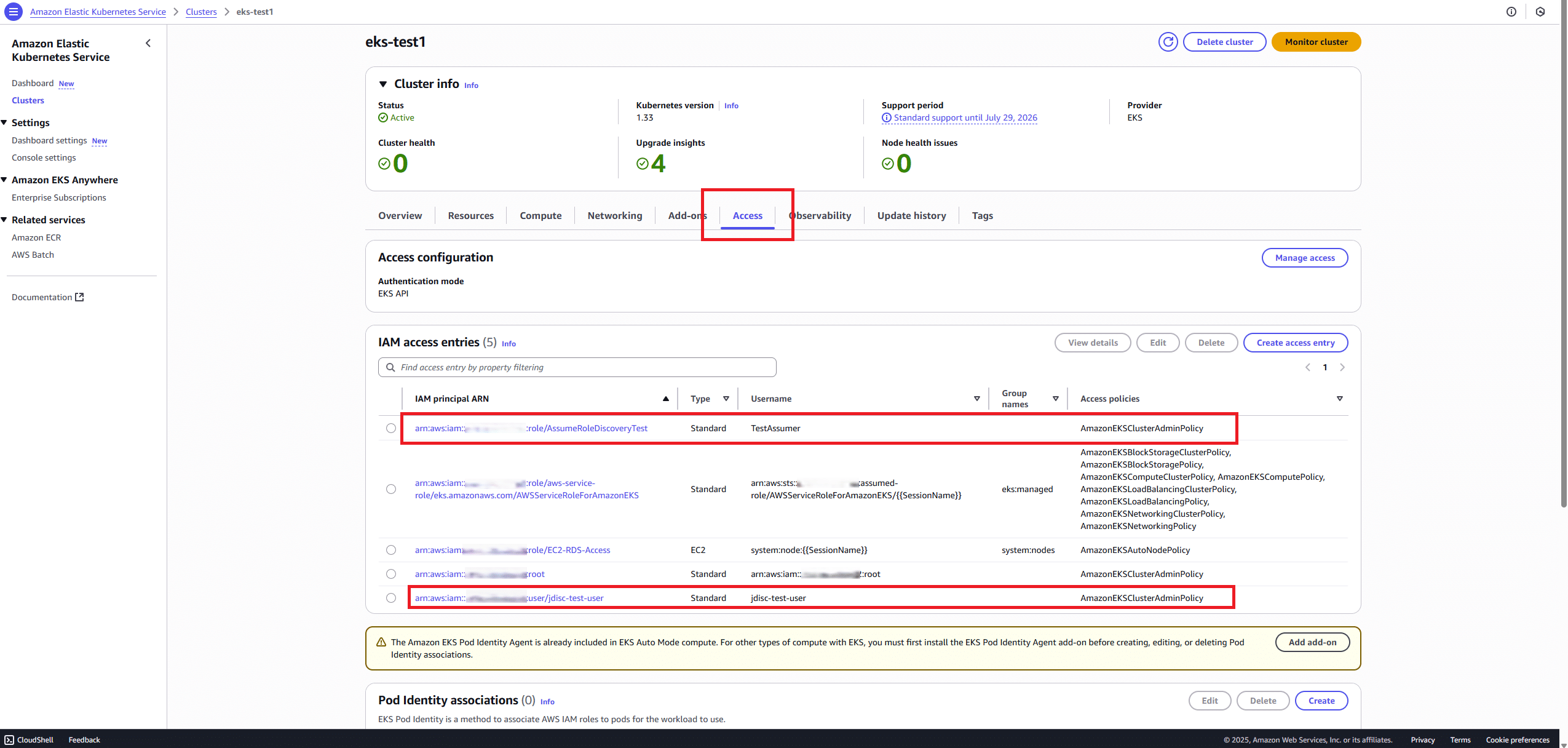
🛠️ Step 2: Grant IAM User Access in EKS
-
Go to EKS > eks-test1 > Access > Manage Access
-
Click Create access entry
-
Enter the following:
-
IAM principal ARN:
arn:aws:iam::Account_ID:user/jdisc-test-user -
Type: Standard
-
Username:
jdisc-test-user
-
-
Attach: ✅
AmazonEKSClusterAdminPolicy -
Leave groups blank
-
Click Review & Create
✅ This replaces the legacy
aws-authConfigMap method.
🔄 Step 3: Update kubeconfig
🔄 Step 4: Set the secret token and the secret key in the environment variables
✅ Step 5: Test with kubectl
If you receive an Unauthorized error, verify:
-
The IAM user is listed in Access Entries
-
You’re using the correct AWS profile
-
The
kubeconfigis properly updated.
🔁 Part B: EKS Kubernetes Discovery via IAM Role
This method is ideal if:
-
You use IRSA, EC2 instance roles, or temp credentials
-
You prefer
sts:AssumeRoleover storing credentials directly
Note Important: The Cluster IAM role must have inside in the Trust relationships: “Action”: [“sts:AssumeRole”, “sts:TagSession”]
🔐 Step 1: Create IAM Role
-
Go to IAM > Roles > Create Role
-
Select Trusted entity = Another AWS Account
-
Enter your AWS account ID
-
Attach:
AmazonEKSClusterAdminPolicy -
Name it e.g.,
AssumeRoleDiscoveryTest
🛠️ Step 2: Trust Relationship Policy
Use this trust policy:
🔧 Step 3: Grant Role Access in EKS
Follow the same steps as in Part A → Step 2, but use:
-
IAM Principal ARN:
arn:aws:iam::Account_ID:role/AssumeRoleDiscoveryTest -
Username:
testassumer -
Access Policy:
AmazonEKSClusterAdminPolicy
🔄 Step 4: Update kubeconfig for the Role
🔄 Step 5: Set the secret token and the secret key in the environment variables
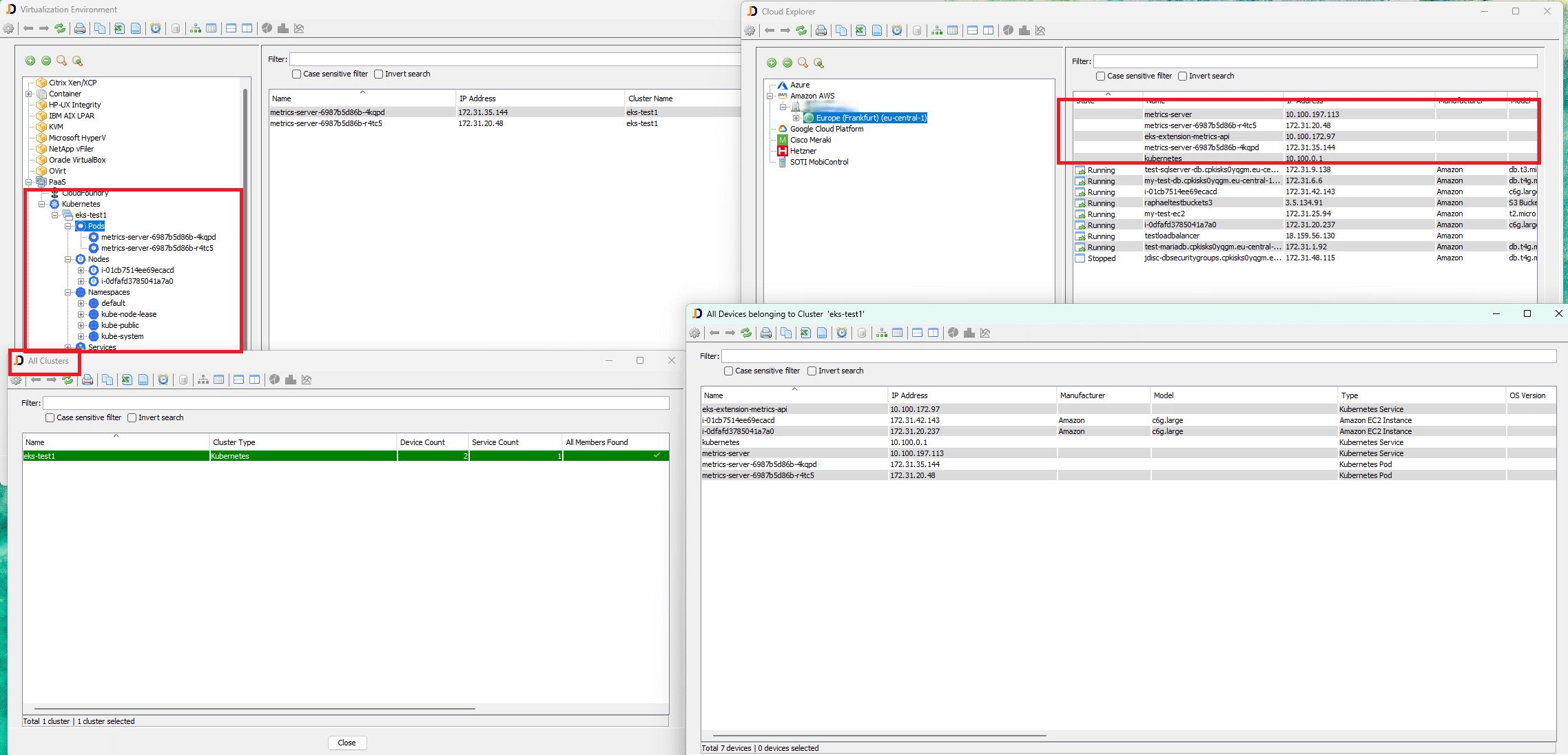
🧭 Configure JDisc for EKS Kubernetes Discovery
-
Go to JDisc → Configuration → PaaS
-
Click Add new configuration
-
Paste the same
kubeconfigyou generated -
Save the entry with a meaningful name (e.g.,
eks-test1-config) -
✅ After saving, click Test Connection to verify access
⚡ Alternative (No kubeconfig): Use a short‑lived EKS token
If you prefer not to configure a kubeconfig, you can provide JDisc with a direct bearer token and the API server hostname.
- Generate a token (valid ~12–15 minutes):
aws eks get-token \
–cluster-name eks-test1 \
–region eu-central-1 \
–output json
From the JSON output, copy the status.token value.
- Find the cluster API server hostname (from your cluster details or kubeconfig). It looks like:XXXXXXXXXXXXX.gr7.eu-central-1.eks.amazonaws.com
- In JDisc → Configuration → PaaS → Add new configuration
- Choose Account mode
- Hostname: paste the API server hostname (no scheme)
- Token: paste the bearer token from step 1
- Save and Test Connection
⚠️ Token expiry: The token is short‑lived. For repeated or scheduled discovery, prefer kubeconfig with role/user auth, or automate token refresh.
💬 Final Thoughts on EKS Kubernetes Discovery in JDisc
With these setup options, JDisc can now securely and flexibly scan Kubernetes clusters hosted on AWS EKS—using either IAM users or IAM roles. This empowers you to:
-
Discover live pods and nodes
-
Integrate token-based kubeconfig generation
-
Run discovery tools (like JDisc) using temporary access
If you’re aiming to align with AWS best practices, IAM Role-based access (especially via IRSA or EC2) is your best bet for scalable and secure Kubernetes discovery.
Let us know how it works for you—and what you’d like to see next in JDisc’s cloud-native support!
Stay cloud-ready,
Raphael Nikou
