


Secure AWS Discovery with IAM Role Support in JDisc
IT infrastructure today spans across multiple clouds, services, and identities. As this complexity grows, so does the need for secure and flexible access control. That’s why we’re excited to introduce a key enhancement in JDisc’s Cloud Discovery module: full support for AWS IAM Role Discovery.
With this update, your discovery jobs can now use IAM Roles instead of static credentials—making access more secure, manageable, and aligned with AWS best practices.
🔐 Why Add Support for AWS IAM Role Discovery?
Previously, JDisc supported AWS discovery via IAM user credentials (Access Key ID & Secret). While functional, this method falls short in more advanced or security-conscious environments that require:
- 🔁 Short-lived credentials
- 🔐 Least privilege enforcement
- 🔄 Cross-account access
- ☁️ Cloud-native identity methods (e.g., IRSA in Kubernetes, EC2 instance profiles)
AWS itself recommends using IAM roles over IAM users—especially in production.
With this update, so do we.
⚙️ What’s New in JDisc Cloud Discovery for AWS IAM Role Discovery?
To support IAM Roles, we’ve extended our Cloud Discovery configuration model with two major improvements:
✅ IAM Role Support for AWS Access
- You can now define AWS Cloud Accounts that authenticate using a Role ARN.
🚀 How AWS IAM Role Discovery Works in JDisc
Here’s how to enable role-based discovery in AWS through JDisc:
- 🔧 Inside AWS: User and Role Setup
To allow JDisc to assume a role for discovery, you need both a user with permissions to assume the role, and a role configured to trust that user.
📌 Step A: Create or Use an IAM User
The IAM user must have a policy like this:
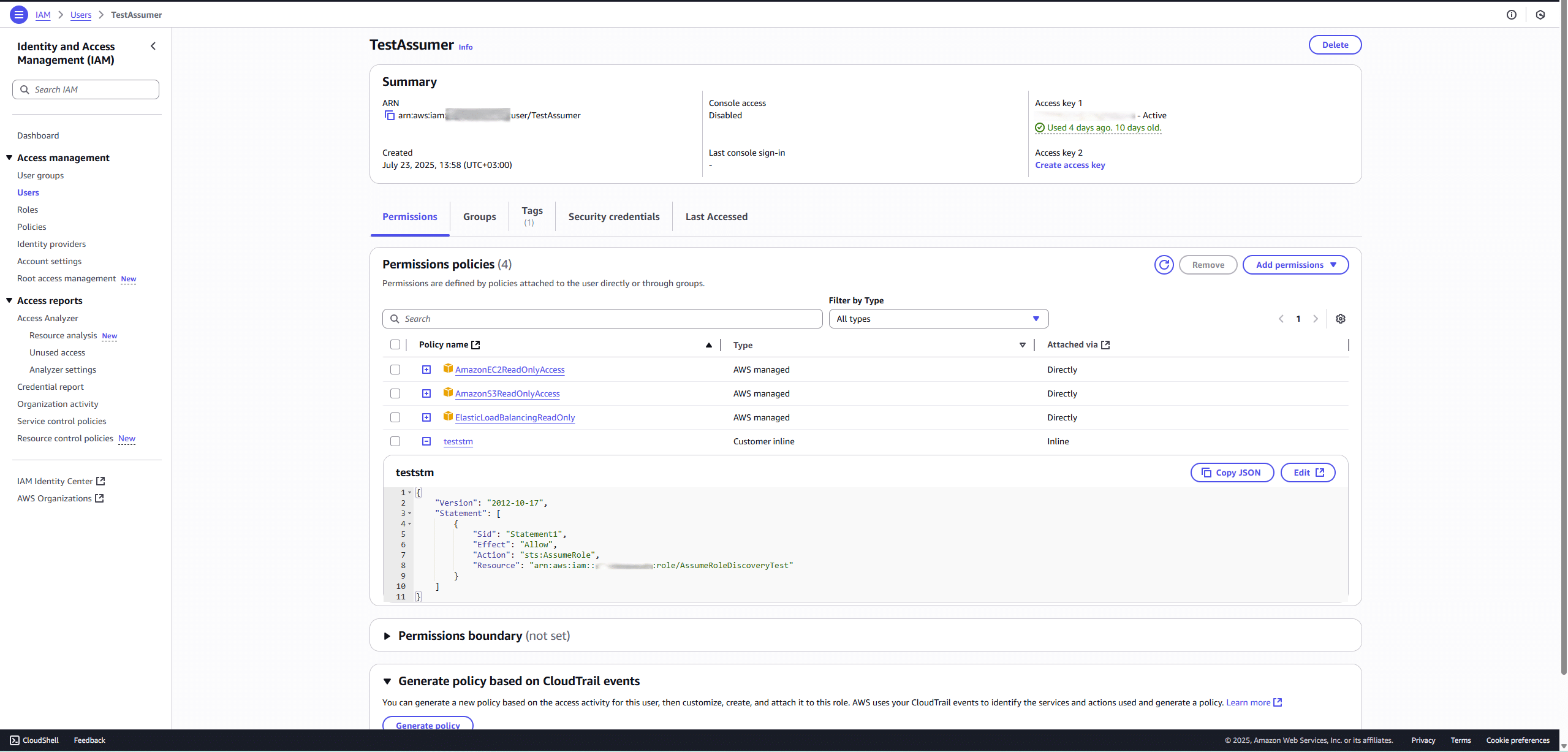
This policy allows the user to assume the target discovery role.
📌 Step B: Create a Role to Be Assumed
In the Roles section of AWS IAM:
- Create a new role (e.g., AssumeRoleDiscoveryTest)
- Go to the “Trust relationships” tab
- Add a trust policy like this:
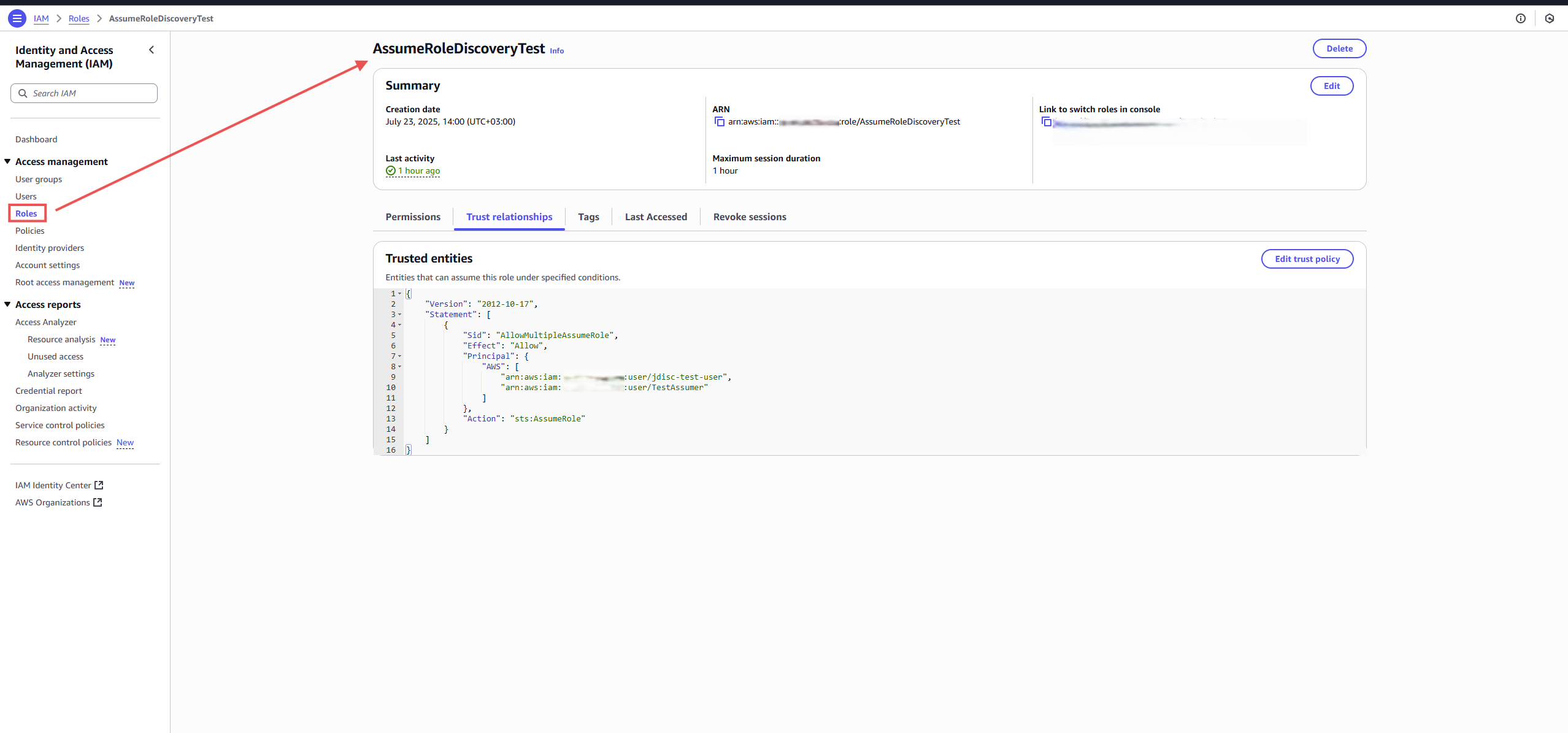
You can either allow multiple IAM users or just one—depending on your organization’s access control requirements.
🔐 Important: Once this is set up, the permissions used for discovery come from the role, not the IAM user. This ensures more controlled and auditable access.
🧭 Update JDisc Cloud Configuration
In JDisc Discovery:
- Go to Settings → Cloud Accounts
- Add a new AWS account
- Choose “IAM Role” as the access type
- Paste the Role ARN (e.g., arn:aws:iam::Account_ID:role/AssumeRoleDiscoveryTest)
- The name of the entry will be used by JDisc as the session name when assuming the role
✅ You can now select this account in your discovery job’s Scope → Cloud Groups to begin using role-based access.
💬 Final Thoughts
This update marks a significant step in how JDisc handles secure, scalable, and cloud-native access to AWS environments.
Whether you’re:
- Discovering production resources across accounts
- Running JDisc inside Kubernetes
- Managing fleet-wide visibility via temporary credentials
…IAM Roles give you the control you need—with the security you require.
Try it out today, and let us know how it helps your cloud visibility strategy. Your feedback helps shape the next generation of JDisc Cloud Discovery.
Stay secure,
Raphael Nikou
