


Windows 11 Compatibility Checker
Introduction: Why Windows 11 Readiness Is Crucial
With Windows 10 support ending in October 2025, IT departments around the globe are gearing up for one of the most significant migrations in recent years. Transitioning to Windows 11 isn’t just a matter of software—it introduces stricter hardware requirements that have never before been enforced at this scale. A Windows 11 compatibility checker makes the life of IT administrators and decision makers a lot easier when it comes to Windows 11 readiness.
Check out our video explaining the new feature.
For enterprises managing hundreds or thousands of laptops, assessing upgrade readiness manually is both impractical and error-prone. IT administrators must validate several technical prerequisites, such as CPU compatibility, TPM availability, and Secure Boot status. Without a centralized, automated solution, the process is not only time-consuming but also vulnerable to inconsistencies.
That’s why we developed the Windows 11 Compatibility Check Report for JDisc Discovery. This new feature automates the evaluation process and delivers a clear, comprehensive view of your hardware readiness across the entire network.

Your Network, No Secrets!
No Blind Spots. No Surprises. Just Full Network Visibility!
The Business Case for an Automated Windows 11 Compatibility Checker
- Time Efficiency
Conducting manual audits on each system is infeasible in most IT environments. Automating this task eliminates hours (or even days) of laborious checks, allowing teams to focus on remediation and strategic planning instead. - Risk Mitigation
Incompatibility issues discovered late in the migration cycle can lead to costly delays and user downtime. Our compatibility report highlights at-risk devices early, providing the insights needed to act proactively. - Budget Planning
Knowing which devices are not Windows 11-ready helps in projecting hardware replacement costs accurately. It supports informed procurement decisions and avoids last-minute budget surprises. - Data-Driven Decision Making
The report provides precise, real-time data for IT leaders to base their decisions on. Instead of guesswork, you get a clear inventory of compliant and non-compliant machines.
Understanding Windows 11 Hardware Requirements
Microsoft has significantly raised the bar for system compatibility in Windows 11. The minimum system requirements reflect a greater emphasis on security and performance. Microsoft has a list of requirements for Windows 11 compatibility. Let’s look at the specific prerequisites checked by JDisc Discovery:
- Processor Compatibility
The CPU must be a 64-bit processor with at least 1 GHz and two or more cores, and it must be on Microsoft’s approved list. This includes many Intel 8th Gen and AMD Ryzen 2000 series or newer chips. - RAM (Memory)
Devices require at least 4 GB of RAM. Systems with less will be flagged as incompatible. - Storage Capacity
Windows 11 needs a minimum of 64 GB of storage. The report checks whether the system meets this criterion. - UEFI Boot Mode
Legacy BIOS is no longer supported. Systems must use UEFI firmware, which allows features like Secure Boot. - Secure Boot
Secure Boot must be available to meet the security baseline of Windows 11. - TPM Version 2.0
Trusted Platform Module 2.0 is a hard requirement for Windows 11. JDisc checks for TPM presence and its version using system-level queries. - Graphics Compatibility
The GPU must support DirectX 12 or later with a WDDM 2.0 driver. This ensures support for the new graphical user interface and display stack.
How JDisc Discovery Delivers Seamless Windows 11 Readiness Checks
JDisc Discovery collects real-time hardware and firmware data from all devices in your network. The new report evaluates each criterion mentioned above, with a granular status for each device.
Status Results Explained
Each criterion receives one of the following statuses:
- OK – Fully compliant with Windows 11 requirements.
- Incompatible – Does not meet the necessary condition.
- Don’t know – Data could not be retrieved or validated.
- Probably yes – Likely compatible, though verification is not 100% certain.
This nuanced approach allows IT teams to distinguish clearly between definite showstoppers and probable candidates for upgrade.
Windows 11 Compatibility Checker Visualization and Reporting
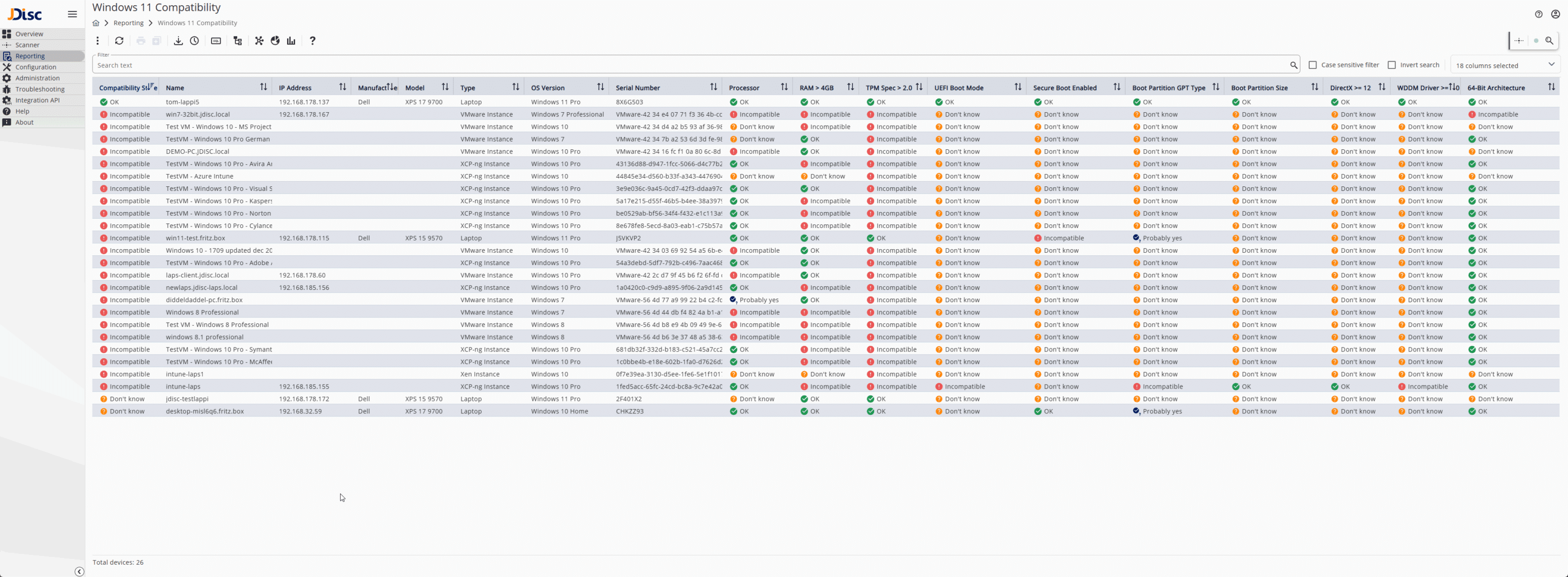
The report includes color-coded visuals for quick scanning and decision-making. Columns are sortable and filterable, making it easy to focus on specific issues such as TPM version or Secure Boot status.
For example, if a fleet of laptops fails the TPM check, administrators can use the filter to isolate and analyze just those entries, possibly confirming whether a BIOS update might enable TPM 2.0.
Sample Use Case: Preparing for a Company-Wide Migration
Imagine an IT administrator managing 1,500 laptops across 12 locations. Planning for a Windows 11 migration using our Windows 11 compatibility checker requires a detailed inventory. By running the JDisc Discovery compatibility report:
- 1,200 systems return “OK”
- 200 show “Probably yes”
- 80 return “Incompatible”
- 20 show “Don’t know”
This categorization allows the IT team to:
- Prioritize replacement or BIOS configuration for the 80 incompatible devices.
- Investigate and confirm the 200 probable candidates.
- Re-scan the 20 unknowns or review access privileges to collect missing data.
Such insights allow for highly targeted upgrade planning, minimizing disruption.
Screenshot: See the Windows 11 Compatibility Checker Report in Action
In the sample screenshot, you can see individual systems listed along with their compatibility status for each prerequisite. Rows are color-coded to provide an at-a-glance overview, while summary statistics at the top show how many systems are fully ready. Easily identify the Windows 11 readiness for each single device and identify what criteria are not fulfilled.
Features include:
- Export to CSV or Excel for documentation and executive reporting.
- Column filtering and sorting to isolate specific concerns.
- Drill-down details for each device.
Beyond Compatibility: Building a Windows 11 Strategy
The Windows 11 Compatibility Report is more than just a checklist. It’s a strategic tool for:
- Capacity planning: Knowing which systems can be retained and which must be replaced.
- Security posture: Identifying devices without Secure Boot or TPM.
- Vendor negotiations: Documenting upgrade needs to negotiate hardware replacement with vendors.
- Executive reporting: Providing dashboards and exports to stakeholders.
Your Network, No Secrets!
No Blind Spots. No Surprises. Just Full Network Visibility!
Conclusion: Accelerate Your Windows 11 Readiness Today using our Windows 11 Compatibility Checker
Migrating to a new OS is never trivial, but with the right tools, it doesn’t have to be painful. JDisc Discovery’s new Windows 11 Compatibility Report equips IT administrators with the data they need to take immediate, informed action.
Stop guessing. Start planning.
Download the latest JDisc Discovery update, run the Windows 11 readiness check, and get your environment future-ready today.
Ready to simplify your Windows 11 migration?
- Contact us for a demo
- Start your free trial
- Visit www.jdisc.itplusdemo.gr to learn more
